How AI Connects Drawings, Specifications, RFIs, and Emails into One Workflow

Summarize this post:

Instantly extract the key takeaways from this article using AI.
Every day on a job site feels like a game of telephone. You look at a sheet. You flip to a page in a massive spec book. Then you check your email. Someone sent an update last week. Where is that thread? Oh, wait, someone else wrote an RFI about this exact detail. Did the engineer reply?
This is how people build today. It is messy. It is slow. Information sits in deep silos. People lose hours looking for a single clear answer. When information sits in separate places, mistakes happen. A field team installs the wrong pipe because nobody saw an updated email chain. A contractor uses an old drawing note because the spec book amendment was in a different folder. These tiny gaps cost real money. They cause delays. They spark arguments that ruin teams.
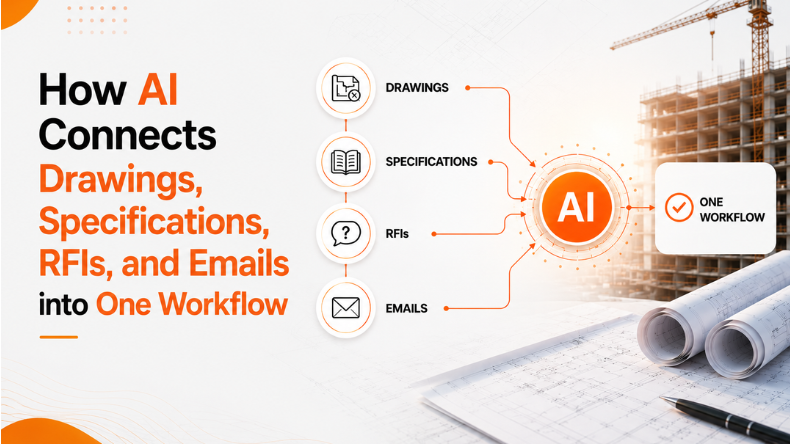
A new system is coming. It changes how project data moves. Instead of five separate tools, everything lives in one spot. This shift relies on Construction AI to bridge the gaps. Think of it as an intelligent assistant that reads your entire project library. It learns how your documents talk to each other. When a new email arrives, the system knows which drawing note it changes. When a submittal comes in, the system checks it against your exact spec sections instantly.
People spend too much time chasing paper. This new technology does the heavy lifting for your team. It handles data entry. It flags errors. It tracks changes across thousands of pages. Your team can finally focus on actual building work instead of endless data sorting.
Submittals can break a project schedule early on. A standard project manual has hundreds of pages. You have to read every section. You must find every product data sheet request. You have to list every sample requirement. Doing this by hand takes days. People miss items.
The old way requires endless scrolling. You copy text from a PDF. You paste it into a blank spreadsheet. It feels like boring homework. If you miss a long lead item, your whole schedule slips. You might wait weeks for a custom door that nobody ordered on time.
New construction submittal software shifts this process from manual tracking to instant setup. You upload your giant specification binder. The system reads every line. It knows CSI divisions. It extracts every test report requirement. It logs every material sample detail. Within minutes, you get a clean log. It is structured and ready for your team.
This setup sets a strong foundation. You get your submittal list on day one. You can assign tasks to subcontractors immediately. No more guessing who supplies what. No more last minute scrambles for missing certificates. The system finds the data so you can plan your buying early.
It does not stop at log creation. The technology also handles compliance checks. When a subcontractor sends a data sheet, the system reads it. It compares the sheet against your spec notes. It looks at model numbers. It checks material types. It flags gaps in seconds. You see if an item is compliant or missing data before it hits your desk.
Construction projects generate a mountain of random text. You have meeting notes, emails, PDF drawings, and contract specs. They all use different formats. They live in different apps. They do not communicate with each other, and a decision made during a Tuesday meeting might change a detail on sheet numbered A202. But if that change stays trapped in a text file, the field team will miss it.
Using artificial intelligence in construction binds these loose ends together. The technology scans every document type. It maps the connections between different files automatically. It understands that an email thread about an HVAC unit connects to a specific drawing schedule, related specification requirements, and any associated RFI responses.
This means your data becomes dynamic. It is no longer a collection of dead files. It behaves like a living network of information. If a vendor emails an update about a pump model, the system flags the relevant spec section, links the communication to the plan sheet, and surfaces any RFIs that may impact the equipment selection.
This link stops information from dying in an inbox. It ensures that office talk matches field reality. When everyone sees the same connected data, disputes disappear. You do not have to wonder if you have the latest note. The system brings the right context to you when you need it.
Traditional file storage is just a digital filing cabinet. You have folders inside folders. Finding a document requires knowing its exact name or location. If someone saves an RFI in the wrong folder, it vanishes. Teams spend hours clicking through paths just to find a simple dimension.
Modern Construction document management changes how you interact with files. You stop searching. You just start asking. The new system lets you type questions in plain English. You can ask about pipe dimensions on the third floor. You can ask about painting requirements for interior walls.
The system reads all drawing notes, specification sections, RFIs, and related project records. It gives you a direct answer in seconds. It does not guess. It does not invent facts. If the information is not in your files, the system tells you.
Every answer comes with clickable links. You click the link, and the system opens the exact drawing sheet. It highlights the specific note in context. This allows your team to verify sources visually. It builds trust in the data. Field superintendents can get answers on a tablet while standing on a slab. They do not need to walk back to the trailer to flip through paper prints.
Emails hold some of the most critical project updates. Subcontractors ask questions. Architects send quick clarifications. Vendors attach product updates. But emails are siloed. They sit in individual accounts. If a project manager goes on vacation, their inbox data is out of reach.
Bringing AI into construction management solves this communication trap. The email AI gives your project a dedicated email address. You forward project chains to this address. The system reads the whole thread. It reads prior messages. It reviews attachments.
The system analyzes the intent of each email. It detects if an email is an RFI question, a clarification request, a submittal discussion, or a specification-related issue. It can then connect the conversation to the relevant project records. It looks for urgency signals. It spots high-priority issues that need quick action. Then, it connects the email to your existing plans and specs.
The system even writes draft responses for your team. It gathers the right project documents. It suggests a clear reply based on your actual specs. Your team keeps full control. A human must review every draft. Nobody sends an automated message without looking. This simply removes the manual chore of hunting for files before you reply. It speeds up communication and keeps answers accurate.
Traditional construction software helps teams store files, track tasks, and manage project records. However, these tools often rely on users knowing exactly where information is stored.
Construction AI platforms take a different approach. Instead of simply storing drawings, specifications, RFIs, submittals, meeting records, and emails, the system understands how those records relate to one another. It can identify connections automatically and surface relevant information when teams need it.
For example, a traditional system may store an RFI in one folder and an architect approval email in another. An AI-powered workflow can automatically connect those records to the affected drawing sheets and specification sections. It reduces manual searching, improves visibility, and helps teams make faster decisions.
The result is a more connected project environment, with information flowing across the project.
Let us look at how this works on a real job site. Imagine a field engineer finds a pipe conflict on site. The drawing shows the pipe running through a steel beam. This is a classic coordination issue.
In the first use case, the engineer opens the system. They type a quick question about beam penetrations. The system scans the specs and drawings. It finds the structural notes instantly. It shows that small holes are acceptable, but large ones need a sleeve. The system provides the exact sheet link. The engineer can verify detail, review any previous RFIs associated with that area, and draft a new RFI if clarification is still required. The system automatically attaches the relevant spec text. The architect gets a clear, complete request right away.
In the second use case, an architect sends an email approval for a new valve model. The email comes into the system. The tool recognizes this is a submittal change. It updates the submittal log. It checks the new valve data sheet against the plumbing specs. It flags that the pressure rating matches your project rule. It prepares a draft email response for the project manager. The manager reads it, clicks approve, and sends it. The entire loop takes two minutes instead of two days.
This is how information should move. It flows from one form to another without human data entry. It removes the friction that slows down builds.
This integrated approach is not just an idea. It is becoming a reality. The team at iFieldSmart AI is building this exact ecosystem. They want to turn scattered project text into searchable intelligence.
The upcoming launch focuses on solving real friction. It targets the hours wasted on administrative work. By using iFieldSmart AI, teams can connect their daily communication with their official records. Meetings become searchable transcripts. Emails become connected project data.
The tool works in the background and it integrates with the systems your team already uses. As a user you do not have to change your core habits. You just get better data access. The platform ensures that your drawings, specs, and emails work as a team.
This tool helps general contractors run tighter projects. It helps subcontractors stay aligned with design changes. It gives owners clear visibility into project choices. With AI, you stop chasing documents and start building with confidence.
A project team holds their weekly coordination meeting to discuss a major ductwork conflict on the second floor.
A concrete supplier delivers a specialized waterproofing additive to the job site, but the delivery ticket looks slightly different from the original design notes.
How does the system read messy hand written notes on old drawing sheets?
The platform uses smart character recognition tools. It reads typed text, stamps, and clear annotations across sheets. It indexes these notes so you can search them later. If a note is legible to a human, the system can usually map it.
Can the email tool send messages without my permission?
No. The system never sends communication on its own. It only reads threads to understand intent and find references. It creates clear drafts for your review. A human must check, edit, and click send every single time.
What happens if my specs conflict with my drawing notes?
The system will pull data from both sources. It highlights what the drawing says and what the spec book requires. It presents both facts side by side. This allows your management team to see the conflict early and write a clarification request.
Do we need to abandon our current project management software?
No. The technology integrates with your existing tracking systems. It connects behind the scenes. It enhances your current files without forcing your team to learn an entirely new platform layout.
How does AI connect RFIs with drawings and specifications?
The system can link RFIs to the relevant drawing sheets, specification sections, emails, and project records. This allows teams to trace decisions, understand design changes, and access supporting documentation without manually searching through multiple systems.
Explore more insights on similar topics
 CONSTRUCTION WORKFLOW AUTOMATION
Managing multiple building sites is a very hard task for construction teams. It becomes challenging...
 CONSTRUCTION WORKFLOW AUTOMATION
The construction industry produces and processes large volumes of data in digital forms such as...
 CONSTRUCTION WORKFLOW AUTOMATION
A construction project generates a huge volume of drawings, specifications, RFIs, submittals, BIM models, and...